Featured Post Today
print this page
Latest Post

Direct Download Links Windows 8 Release Preview (RC Build)

This new "Release Preview" build is actually the "Release Candidate" (RC) build of Windows 8 which means there are very less chances that Microsoft will add any new feature or make major UI changes in final RTM build of Windows 8. You should expect only bug fixes and performance enhancements in RTM build. The only UI change which you might see in RTM build is the removal of Aero glass as mentioned by Microsoft in a recent official post at Windows 8 blog.


 Windows 8 Release Preview is now available officially from Microsoft servers. Microsoft has made it available to Download Windows 8 Release Preview version for general public. The latest version of Windows 8 Release Preview is modified prerelease software before its goes commercially for general public worldwide. Some product features and functionality may require additional hardware or software to run Windows 8 Release Preview. Microsoft has first launched the Developers Preview of Windows 8 in September last year 2011 and the Consumer Preview in early February 2012 this year. This version is the latest Release Preview version of Windows 8 which should have several improvements compared to the old Developer Preview and Consumer Preview versions.


 If you’re an MSDN or TechNet subscriber, you can now grab the RTM version of Windows 8 from either service. Microsoft had promised in an earlier blog post that today would be the day developer access would be begin, and they’ve made good on that promise. The next milestone is tomorrow, when the Enterprise version of Windows 8 will become available to those with Software Assurance contracts, as well as Partner Network folks getting the regular version.


Release Preview of Windows 8 will expire on January 15th, 2013.
Windows 8 Release Preview is available in Arabic, English, Chinese (Simplified), Chinese (Traditional), French, German, Japanese, Korean, Portuguese (Brazil), Russian, Spanish, Swedish, and Turkish languages.
Both 32-bit (x86) and 64-bit (x64) versions are available for download.
If the setup asks for a product key at installation time, please use following product key provided by Microsoft:
TK8TP-9JN6P-7X7WW-RFFTV-B7QPF

System Requirements for Windows 8 Release Preview:
The system requirements for Windows 8 Release Preview are as follows. Windows 8 Release Preview works great on the same hardware that powers Windows 7.
  • Processor: 1 gigahertz (GHz) or faster
  • RAM: 1 gigabyte (GB) (32-bit) or 2 GB (64-bit)
  • Hard disk space: 16 GB (32-bit) or 20 GB (64-bit)
  • Graphics card: Microsoft DirectX 9 graphics device with WDDM driver
Additional requirements to use certain features:
  • To use touch, you need a tablet or a monitor that supports multitouch.
  • To access the Windows Store and to download and run apps, you need an active Internet connection and a screen resolution of at least 1024 x 768.
  • To snap apps, you need a screen resolution of at least 1366 x 768.
  • Internet access (ISP fees might apply)
Windows 8 Release Preview Direct Download Links:
The direct Download Links of Windows 8 Release Preview are as follows:
  • Windows 8 Release Preview 64-bit (x64) Version - Download Here (3.3 GB Size) (Sha 1 hash — 0xD76AD96773615E8C504F63564AF749469CFCCD57)
  • Windows 8 Release Preview 32-bit (x86) Version - Download Here (2.5 GB Size) (Sha 1 hash — 0x8BED436F0959E7120A44BF7C29FF0AA962BDEFC9)
  • Windows 8 Release Preview on Technet - Click Here
Windows 8 Release Preview Genuine Product Key:
Following is the Original and Genuine Product Key of Windows 8 Release Preview version.
  • TK8TP-9JN6P-7X7WW-RFFTV-B7QPF

 Other Language

English
64-bit (x64) Download (3.3 GB)
32-bit (x86) Download (2.5 GB)
Arabic
64-bit (x64) Download (3.3 GB)
32-bit (x86) Download (2.5 GB)
Chinese (Simplified)
64-bit (x64) Download (3.4 GB)
32-bit (x86) Download (2.6 GB)
Chinese (Traditional)
64-bit (x64) Download (3.4 GB)
32-bit (x86) Download (2.6 GB)
French
64-bit (x64) Download (3.3 GB)
32-bit (x86) Download (2.5 GB)
German
64-bit (x64) Download (3.3 GB)
32-bit (x86) Download (2.5 GB)
Japanese
64-bit (x64) Download (3.3 GB)
32-bit (x86) Download (2.5 GB)
Korean
64-bit (x64) Download (3.3 GB)
32-bit (x86) Download (2.5 GB)
Portuguese (Brazil)
64-bit (x64) Download (3.3 GB)
32-bit (x86) Download (2.5 GB)
Russian
64-bit (x64) Download (3.3 GB)
32-bit (x86) Download (2.5 GB)
Spanish
64-bit (x64) Download (3.3 GB)
32-bit (x86) Download (2.5 GB)
Swedish
64-bit (x64) Download (3.3 GB)
32-bit (x86) Download (2.5 GB)
Turkish
64-bit (x64) Download (3.3 GB)
32-bit (x86) Download (2.5 GB)

 NOTE: Skip Ads on the right upper site  on Download
  
Permanent Activator click Here
1 comments
Posted by: Jaime
blognizend, Updated at: 11:59 PM

Activate and Installing Windows 8

WINDOWS 8

1.a] Burn "
WINDOWS 8.iso" at least possible speed (4x)
USB Bootable: http://blogmytuts.blogspot.com/2011/10/create-bootable-usb-drive.html

1.b] As the ISO is bootable, you can boot through the DVD/USB(for tutorial on how to install W8 using USB check the provided link above) and start installing W8

1.c] Once the installation started, choose your version of W8 and finish the instalation


OPTIONS TO ACTIVATE WINDOWS 8
ACTIVATING WINDOWS PERMANENTLY

2.a] Download and execute "K.J_121103.exe" as ADMIN

2.b] click ENGLISH for english language, wait til the activation process may take couple of minutes, after that you must see
Activation Sucessfull message on screen, which will lead you to restart.


Note : This activator must activate your windows Permanently and enable Personlization settings. If it falied to Enable Personlization Settings
Please follow the below instructions


HOW ENABLE PERSONALIZATION SETTINGS (YOU SHOULD ACTIVATE WUNDOWS 8 FIRST BEFORE FOLLOWING THIS STEPS (2.a) FIRST)

These instructions are ONLY for those who are not able to access the personlization settings after Activating Windows Peminently.

3.a] RUN "FIX_P8.25.exe" as ADMIN

3.b] Windows CMD will automatically Run fix and restart your PC

After restart, you should be able to Access Personlization settings

Enjoy !!
NOTE: always RUN AS ADMIN when using the activator


Download Windows 8


Proof Of the permanent Activator Windows 8 AIO 72 Final Build 9200 Multi6 + Permanent Activator
No WATERMARK (CLICK ON THE IMAGE TO SHOW IN FULLSCREEN)
Windows 8 AIO 72 Final Build 9200 Multi6 + Permanent Activator
PC Settings
Windows 8 AIO 72 Final Build 9200 Multi6 + Permanent Activator
PERMANENT AVTIVATOR (The screenshot snapped from win pro but don't worry about that they're the same)


Windows 8 AIO 72 Final Build 9200 Multi6 + Permanent Activator  

Activator:


Windows 8 PERMANENT ACTIVATOR (credit to massam)
http://adf.ly/EOJJS
DL via Google Docs   
Note: Skip Ads  on upper right Side
1 comments
Posted by: Jaime
blognizend, Updated at: 11:57 PM

DriverPack Solution 2012

DriverPack Solution is completely FREE and handy software for a Tech guy like me!
DriverPack Solution is the most popular program that makes the job of finding and automatically installing drivers a pleasure.
DriverPack Solution simplifies the process of reinstalling Windows on any computer. No more problems with searching and installing drivers. Everything will be done in a couple of mouse clicks!


  • Automated driver installation
  • The program installs all required drivers to any computer in just about 5 minutes.
  • Saves Time and money
  • No more wasting time on looking for drivers; all required drivers will be installed with only a few clicks.
  • Any driver for any computer
  • All drivers on a single DVD!
    Simplifies downloading new drivers from the Internet.
  • Drivers update capability
  • Updates previously installed drivers to their latest versions.
  • Windows 8 / 7 / Vista / XP
  • Supports all modern operating systems!
    Both 64-bit and 32-bit versions!
  • Easy to use
  • Simple and foolproof interface.
  • Customization ability
  • Our program is open source software.
  • Distributed for FREE
  • Under the GNU GPL license.


DriverPack Solution 12.3 Lite
Price: Free (Open Source)
Size: 7Mb
DriverPack Solution 12.3 Lite - a lite version of the most powerful manager for automated driver installation. Scans your computer hardware and offers a download from the Internet unidentified driver. Quickly, efficiently and completely FREE!


* Lite version does not include database drivers, software and diagnostic tools. For permanent use it is recommended to download the full version.


DriverPack Solution 12.3 Full
Price: Free (Open Source)
Version: 12.3 R255 (17.03.2012)
Requirements: Any PC (desktop/laptop/netbook)
Windows 8 / 7 / Vista / XP (x32-x64)
Size: 3Gb
DriverPack Solution 12.3 - a full version of the most powerful manager for automated driver installation. Scans your computer hardware and offer to install/update the driver for all devices in Offline mode. Quickly, efficiently and completely FREE!


* Downloading via Torrent. Your ISP may be blocking the traffic while downloading via torrent.
0 comments
Posted by: Jaime
blognizend, Updated at: 11:56 PM

Torque Android Tablets Proudly Pinoy Made

Torque Android Tablets Proudly Pinoy Made


Torque known for their cheap dual SIM and Triple SIM Handset Phone.
TORQUE is a dynamic brand with a superior product portfolio that aims to cater to the ever changing technological needs of the market. TORQUE offers consumer electronics and telecommunication devices with sleek, functional designs and up-to-date features at very competitive pricing. Our aim is to improve each individual's lifestyle while maximizing the value for money. TORQUE is available nationwide and has excellent service support centers.


Readmore-------------->>>http://blogmytuts.blogspot.com/2012/10/torque-android-tablets.html


0 comments
Posted by: Jaime
blognizend, Updated at: 9:41 PM

Windows 7 USB/DVD Download Tool


Windows 7 USB/DVD Download Tool


When you purchase Windows 7from Microsoft Store, you have the option to download an ISO file or compressed files. TheWindows 7 USB/DVD Download tool allows you to create a copy of your Windows 7 ISO fileon a USB flash drive or a DVD. To create a bootable DVD or USB flash drive, download theISO file and then run the Windows 7 USB/DVD Download tool. Once this is done, you can install Windows 7 directly from the USB flash drive or DVD.
The ISO file contains all the Windows 7 installation files combined into a single uncompressed file. When you download the ISO file, you need to copy it to some medium in order to installWindows 7. This tool allows you to create a copy of the ISO file to a USB flash drive or a DVD. To install Windows 7 from your USB flash drive or DVD, all you need to do is insert the USB flash drive into your USB port or insert your DVD into your DVD drive and run Setup.exe from the root folder on the drive.
Note: You cannot install Windows 7 from the ISO file until you copy it to a USB flash drive or DVD with the Windows 7 USB/DVD Download tool and install from there.
The copy of the ISO file that the Windows 7 USB/DVD Download tool creates is bootable. Bootable media allows you to install Windows 7 without having to first run an existing operating system on your machine. If you change the boot order of drives in your computer's BIOS, you can run the Windows 7 installation directly from your USB flash drive or DVD when you turn on your computer. Please see the documentation for your computer for information on how to change the BIOS boot order of drives.
You may make one copy of the ISO file on a disc, USB flash drive or other media in order to install the software on a computer. Once you have installed the software on a computer, the license terms that accompany the software apply to your use of the software and replace these terms. The license terms for Windows 7, once accepted, permit you to make one copy of the software as a back-up copy for reinstallation on the licensed computer. If you do not delete the copy of the ISO file you made to install the software on your computer, then the copy of the ISO file constitutes your back-up copy.

This is I used when making a bootable USB with windows 7 OS to reformat a netbook laptop


0 comments
Posted by: Jaime
blognizend, Updated at: 11:30 PM

Get Free Payonner Master Card


Payoneer Cards are available for Infolinks, the fastest way to pay is via ATM card

To get paid using Payoneer please apply for a Payoneer account. Click here to get your Prepaid MasterCard® or to sign up for the Local Bank Transfers service by Payoneer.

If you are an existing Payoneer cardholder, Click here and follow the "Already applied for a Payoneer account" button to connect your existing card with this account.

Once your application is approved, you will be able to choose Payoneer as your payment option. Once approved, return to this page, select Payoneer and click “next” to continue and save your payment choice.

You may select a different payment method while waiting for your request to be approved by Payoneer.

For more information about the application process and the shipping details, login to your Payoneer account or contact Payoneer.

Log in to your infolinks account select payment method ..


Is just a 123 step to get your own debit card


NOTE: You Need a Valid ID like postal ID driver license or Voters ID for STEP3


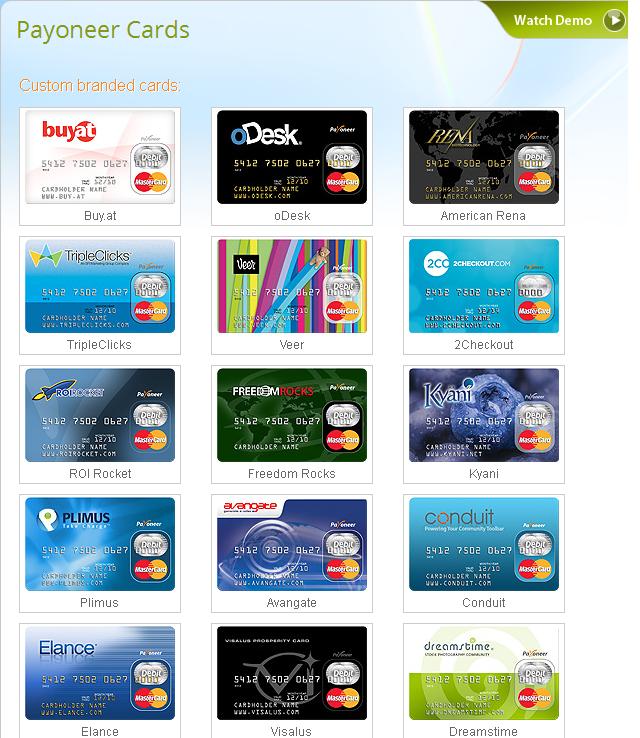
 You can check other Payoneer Branded Card like Odesk. visits http://www.payoneer.com/payoneercards.aspx


0 comments
Posted by: Jaime
blognizend, Updated at: 12:42 AM
 
Support : Creating Website | Johny Template | Mas Template
Copyright © 2011. blognizend - All Rights Reserved
Template Created by Creating Website Published by Mas Template
Proudly powered by Blogger
Google+ Jaime Lacson