Featured Post Today
print this page
Latest Post
Showing posts with label Tricks. Show all posts

Ask Google where your phone is

Have you lost or forget where did you put Phone?
Instead of searching your phone everywhere, just ask Google where your phone is, and the search engine giant will answer you the exact place where you left your smartphone.

 Google has discharged another highlight to scan for your lost phone or tablet.


 Google unveiled a new feature on Wednesday that lets you search for your Android smartphone or tablet using the search engine on your desktop computer.


How does it work?

Log-in to the same Google account on your desktop computer’s browser that you use on your Android smartphone, but before that make sure you must have the latest version of the Google app installed on your smartphone. Touch Update if not updated.


Now type "Find my phone" into Google's search engine, and that’s it.


If you have more Device than one you can Choose which one your want to locate..


As soon as you press the enter or ALLOW button click Accept button , Google will contact and display a map that eventually shows you a location on the map that is accurate to a certain distance, as for example, the map showed me the location of my smartphone was accurate to 12 meters.


 However, what if your phone is not visible to you?

Google also offers you a Ring button on the map in order to pinpoint your phone.
You just need to click on Ring icon and the search engine giant will ring your smartphone at full volume for up to five minutes. Moreover, once you hand on it, simply press the power button to turn off the ringing.


Known as Android Device Manager can also help you locate and ring your Android devices. 
Tested :P


 Also in case your Android device has been stolen, this feature helps you to factory reset your device remotely and reset the password if the device is recovered or erase its data.

Press Set Lock and Erase  You  can change the screen lock and erase all data


Having Trouble ?


Link your Android phone

Step 1: Update the Google app

  1. On your phone, go to the Google app page on the Play Store.
  2. Touch Update.


Step 2: Turn on Google Now

  1. On your phone, open the Google app .
  2. In the top left corner, touch the Menu icon menu icon > Settings > Now cards
  3. Turn on Show cards.
  4. Turn on Show notifications.


Step 3: Turn on Web & App Activity

  1. Visit the Account History page.
  2. Make sure the switch is on (green/blue).


Visit : https://support.google.com/websearch/answer/6128427?p=find_android&rd=1#findmyphone


0 comments
Posted by: Jaime
blognizend, Updated at: 1:06 AM

DOWNLOAD ANTI DEEPFREEZE

Deep Freeze is a good program if you want to keep your system secure, but it can be a real pain if YOUR FORGOT you’re no longer using it and want it off your system. Before you can uninstall Deep Freeze, you have to disable it. To disable it, you’ll need the password. If you want Deep Freeze gone for good, follow this guide to remove it with or without the password


There is no uninstall file for Deep Freeze. Instead, you will need to run the file that installed the program to begin with. If you no longer have the installation file, you can download it again from the Deep Freeze website.

    The file for Deep Freeze 5 is typically: DF5Std.exe
    The file for Deep Freeze 6 is typically: DF6Std.exe
    The file for Deep Freeze 5 is typically: DF7Std.exe
 
TURN OFF YOUR ANTIVIRUS WHEN USING THIS TOOLS

GOOGLE DRIVE


4SHARED LINK


0 comments
Posted by: Jaime
blognizend, Updated at: 10:48 AM

How to Show Password in asterisk or dot (WiFi Password , User Log in)

I receive a message in my page asking how to show the  WiFi password in asterisk or dot of her neighborhood.

Here is blogmytuts tutorial for this day How to Show Password in asterisk or dot (WiFi Password , User Log in)


Solution 1:
If  you are already connected  and you don't know what is the WiFi password (usually the owner type the password for you and not showing or telling the password).
This is the trick for that ..

  1. click the  WiFi network name 
  2. click properties  
  3. check show character


Solution 2:
If you can access the IP address login in default user go to wifi security
used this java script
javascript: var p=r(); function r(){var g=0;var x=false;var x=z(document.forms);g=g+1;var w=window.frames;for(var k=0;k<w.length;k++) {var x = ((x) || (z(w[k].document.forms)));g=g+1;}if (!x) alert('Password not found in ' + g + ' forms');}function z(f){var b=false;for(var i=0;i<f.length;i++) {var e=f[i].elements;for(var j=0;j<e.length;j++) {if (h(e[j])) {b=true}}}return b;}function h(ej){var s='';if (ej.type=='password'){s=ej.value;if (s!=''){prompt('Password found ', s)}else{alert('Password is blank')}return true;}}

Or, alternatively you can use this" Blogmytuts Show Password "Bookmarklet by dragging it to your Bookmarks Bar to instantly view hidden passwords at the click of a button.


 Just click Show Password to reveal the password


 Tutorial by blogmytuts
blogmytuts
2 comments
Posted by: Jaime
blognizend, Updated at: 1:09 AM

How to Uncapped or Reset Bandwidth Limit MyBro/PLDT/SMARTBRO

How to Reset  MyBro   Bandwidth Limit

FAIR USAGE POLICY MYBRO/PLDT/SMARTBRO! (FPU)

 NOTE: SMART look our  MAC Address   then verify bandwidth and user log in.When plug the SmartBro /MyBro  to other Computer or Router SMARTBRO/ MyBro Portal ask for Service reference number/Account number becuase it detects new MAC Address.

In this way we can reset the Bandwidth used  or uncapped.


Uncapped VIA router change mac:
Reset Account Bandwidth Limit without using more than one computer
1.)-Connect one computer to the router via lan cable
-Open the router's administration tool "http://192.168.1.1/" or "http://192.168.0.1/"(depended sa inyo router brand)

Sample : CD RKING


-log in using your account or default router account .

2.)Open the internet Setup Tab
3.)locate "Dynamic ip(DHCP) Internet connection type

4.)Change the mac address clone section last column or number) kung wala mag lagay ka
pwede mo kunin yung mac ng PC mo at change yung dulo mac

 type mo cmd sa search  run cmd naman sa XP

Or Punta ka dito para sa tuts  ->>> http://blogmytuts.blogspot.com/2012/05/setup-cd-r-king-lo-series-for-globe.html

 Ganito yun:


5.) access this link "https://portalln.mybro.pldthome.com/login.php"(recommended po ang Firefox browser for faster responds)
6.)login to your account (service reference number/account number )na makikita sa inyo billing paper.
7.)wait po kayo ng 5min..para ma reconnect ulit sa internet.
8.)open po kayo ng cmd(type nyo po "ipconfig /release" and "ipconfig /renew")
9)done..enjoy your uncap bandwidth. (repeat again kong na abot nyo ulit ang 15gb limit.)


UPDATE FOR DIRECT PC/LAPTOP REPLY POST FOR NAKAKAULOL

UNCAPPED ,CHANGE MAC FOR LAN:

Follow this image here

1. Go to your LAN status


2. after click configure
go to advance
click network addres
input new mac address in Value


before..


after..


blogmytuts
8 comments
Posted by: Jaime
blognizend, Updated at: 1:07 AM

How to create windows 7 image backup

Windows 7 backup utilities are actually pretty impressive and creating an image will be possible in all versions. Today we take a look at creating a backup image of your machine without the need for a third party utility like Norton Ghost or True Image that are usually used in computer shop.

 Technician like me used this tools to install a fresh image to other PC. This is more faster than performing a REFORMAT a crush Windows .

You just just finished installing a fresh copy of Windows 7 on your computer and have it set up to your liking. One of the first things you should do now is create an image of the disc so in the event of a crash you will be able to restore it to its current state. An image is an exact copy of everything on the drive and will restore it back to its current state. It’s probably best to create an image when everything is clean and organized on your system. This will make the image file smaller and allows you to restore the system with a smooth running set up.


 Creating an Image in Windows 7 CLICK HERE


0 comments
Posted by: Jaime
blognizend, Updated at: 1:17 AM

How to Submit a Sitemap on Google


SUBMIT A SITEMAP

Go  to Webmaster tool  <----click it

Find Optimization click Site  maps


Click Add Sitemap
Now use this:

For Blogs with posts less than 500

    atom.xml?redirect=false&start-index=1&max-results=500

             If your post count is more than 500 but less than 1000 then submit the following two sitemaps instead:

For Blogs with posts less than 1000

    atom.xml?redirect=false&start-index=1&max-results=500

    atom.xml?redirect=false&start-index=501&max-results=500


For Blogs with posts less than 1500

Similarly if your post count is greater than 1000 but less than 1500 then you will submit the following sitemaps and so on...

    atom.xml?redirect=false&start-index=1&max-results=500

    atom.xml?redirect=false&start-index=501&max-results=500

    atom.xml?redirect=false&start-index=1001&max-results=500


You have now successfully generated or created the sitemaps. Lets know submit them to Google.


0 comments
Posted by: Jaime
blognizend, Updated at: 7:34 PM

Write Anything in Your facebook status in Blue link Style


Instruction:

Copy the following codes in your facebook status or comment.


Code:
@[1: ]@@[1:[0:1: Your Text Here ]]

then Replace "Your text Here", whatever you like,

for example:

Code:
@[1: ]@@[1:[0:1: "Your facebook status in blue" ]]
then mag ddisplay lang ang "magandang hapon" in blue link.

you can try it on group wall..
0 comments
Posted by: Jaime
blognizend, Updated at: 10:41 PM

Make Your Windows Faster

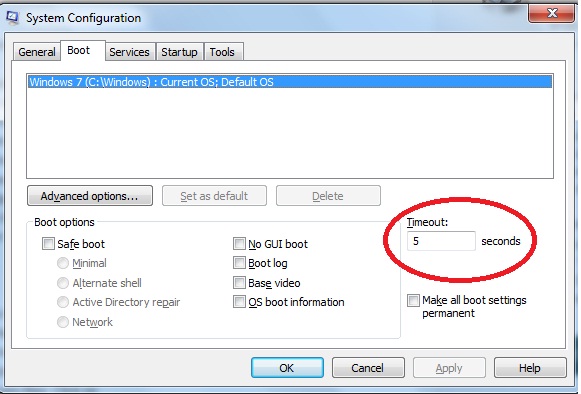
1. Run "msconfig"
2.By default, it's 30, which means 30 seconds of wait time before boot. This can be changed, make it 3 seconds. (Note: if you have more than one operating system, this means the wait time to startup to the highlighted Operating System. Sometimes you might want a bit more than 3 seconds than you can opt 5 or 10 seconds). Apply and click Ok.


0 comments
Posted by: Jaime
blognizend, Updated at: 3:30 AM

Unhide Folder cause by Virus

1. open windows command prompt.

2. then type your flash disk directory in win command prompt, for e.g.: E: then enter.

3. after that, type attrib -s -h /s /d then press enter.

4. after this process all of your folders and files will come back.


0 comments
Posted by: Jaime
blognizend, Updated at: 3:23 AM

SMART SIM no Signal


SMART SIM no Signal


TIP#1
Note before you text the ROAM, you must have atleast P1.00 in your airtime load.
Dapat din below P100 ang load para hindi makainan ng load.

1. Text ROAM ON to 333 (Ignore the text message you will receive about roaming service)
2. Text ROAM OFF to 333
3. Text 3G ON to 211
4. Wait until the signal appears again. If wala pa din, Refresh/Restart the phone.
5. Boom!

TIP#2
Ubos Load Trick
- ubusin lang ang load mo.
- magpapasa ka ng atleast P2.00
- send 3G ON to 211
- makakareceive ka ng message from SMART na ganito:
Code:

Your MMS/GPRS/3G service features have been activated.

- kung loloadan mo lang ng AlllTxt10/AllTxt20, kailangan mo pa din ng regular
load for atleast P2.00 kasi hindi maactivate ng Alltxt ang GPRS/3G mo,
tried and tested by me.
0 comments
Posted by: Jaime
blognizend, Updated at: 3:12 AM

How to Post with a blocked Website

I was posting my blog with a shorten link and its was block by Facebook


Heres the Trick

 Paste  and Post

Yes Paste and Paste ,after paste click Post as fast as you can.. you must post it before  the Image start appearing.


1 comments
Posted by: Jaime
blognizend, Updated at: 1:32 AM

How to Put AdBrite ads with no Errors

 You might have a trouble like this one..


1. Go to Dashboard > Design > Edit HTML > Expand Widget Template and look for
<div class='post-body entry-content'>

2. Get Adbrite ads code and paste to Notepad. In Notepad press 'CTRL' + 'H'.
Replace
< with &lt;
and
> with &gt;

Also replace ” with &quot;

3. Now add this code below <div class='post-body entry-content'>
Save template.


Your code should be like this
width="300"><!-- Begin: adBrite, Generated: 2012-03-14 3:53:16  -->
&lt;script type="text/javascript">
var AdBrite_Title_Color = 'E1771E';
var AdBrite_Text_Color = 'FFFFFF';
var AdBrite_Background_Color = '333333';
var AdBrite_Border_Color = 'CCCCCC';
var AdBrite_URL_Color = '008000';
try{var AdBrite_Iframe=window.top!=window.self?2:1;var AdBrite_Referrer=document.referrer==''?document.location:document.referrer;AdBrite_Referrer=encodeURIComponent(AdBrite_Referrer);}catch(e){var AdBrite_Iframe='';var AdBrite_Referrer='';}
&lt;/script&gt;
&lt;script src="http://ads.adbrite.com/mb/text_group.php?sid=2117253&amp;zs=3330305f323530" type="text/javascript"&gt;&lt;/script&gt;
<div><a target="_top" href="http://www.adbrite.com/mb/commerce/purchase_form.php?opid=303771&amp;afsid=1" style="font-weight:bold;font-family:Arial;font-size:13px;">Your Ad Here</a></div>
<!-- End: adBrite -->


Another way is to create a HTML gadgets  and paste your Code

     Require sites to have a top-level domain and no longer accept sites that use free blog hosting solutions like Blogspot, Hpage, Tumblr, .tk, or .co.cc.  If you would like to use adBrite please use a paid service that provides a top-level domain.
hostgator coupon page
1 comments
Posted by: Jaime
blognizend, Updated at: 2:32 AM

A Little Fun with Google

Happy Valentines GO and Search this on Google


(sqrt(cos(x))cos(400*x)+sqrt (abs(x))-0.4)(4-x*x)^0.1
1 comments
Posted by: Jaime
blognizend, Updated at: 7:16 AM

How to Disabled Autorun

 Removable USB/thumb drives use the Autorun feature to load files when the drives are plugged into the USB port. Malware exploits the Autorun feature to spread from thumb drive to PC. Disable the autorun feature to prevent malware from spreading.
1.The easiest and most effective means to truly disable autorun can be done via this simple autorun registry hack:

REGEDIT4
[HKEY_LOCAL_MACHINE\SOFTWARE\Microsoft\Windows NT\CurrentVersion\IniFileMapping\Autorun.inf]
@="@SYS:DoesNotExist"

To use this method, Open Notepad and copy/paste the following into a text file:

REGEDIT4
[HKEY_LOCAL_MACHINE\SOFTWARE\Microsoft\Windows NT\CurrentVersion\IniFileMapping\Autorun.inf]
@="@SYS:DoesNotExist"


2.Save the file as something.reg. (You have to be sure to change the "Save File as Type" to "All Files" before saving, or Windows will try to save it as a .txt even if you typed in .reg.

Locate the file you just saved and double-click the file to run it. You will receive a prompt asking if you want to add the data to the registry. Click yes to allow the modification.


0 comments
Posted by: Jaime
blognizend, Updated at: 1:42 AM

Make Your CMD Pinger More Attractive!!! [PINGER FOR BUBU, HSS, EXPAT, & OTHER VPNs]

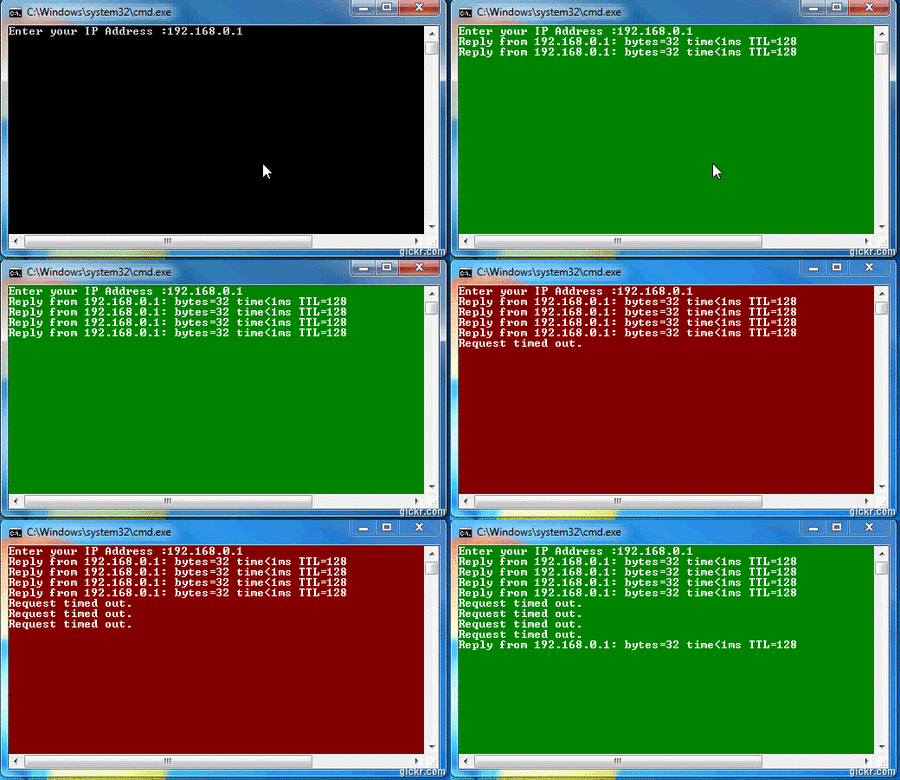
My CMD Pinger with reply background color indicator!

We are using ping command to monitor the networks, sometimes we have to monitor multiple IP address with continuous ping in different windows. Normal command line is with a black colour background and white text. But it will be better to show a red window if the Request timed out. And the default success pings with a green background. Here is the script to do the ping with color output results.


Color Legend:
Green - with reply
Red - request timed out

What is happening in this Batch file?

Prompting an IP address and set to a variable named %IP%, and its pinging once with 32 bytes of data. If it is failed the background color will change to red. And display “Request timed out” then wait for some title . We used a self ping for sleep function. The code put it in loop so it will ping continuously.
Original Batch Script

:: Batch Script
:: color Ping
:: Code By Binbert.com
echo off & cls
set /p IP=Enter your IP Address :
:top
PING -n 1 %IP% | FIND "TTL="
IF ERRORLEVEL 1 (SET OUT=4F & echo Request timed out.) ELSE (SET OUT=2F)
color %OUT%
ping -n 2 -l 10 127.0.0.1 >nul
GoTo top
My Modified Batch Script

:: Batch Script
:: Color Ping
:: Code By Binbert.com
:: Edited By FreeSoftAppZ.webs.com
echo off & cls
:top
PING -n 1 www.google.com | FIND "TTL="
IF ERRORLEVEL 1 (SET OUT=4F & echo Request timed out.) ELSE (SET OUT=2F)
color %OUT%
ping -n 2 -l 10 127.0.0.1 >nul
GoTo top

Additional command by sir edzrhomski07
siguro lagyan mo nito ts. para di masyado malaki.

:: Batch Script
:: Color Ping
:: Code By Binbert.com
:: Edited By FreeSoftAppZ.webs.com
mode 53, 20
echo off & cls
:top
PING -n 1 www.google.com | FIND "TTL="
IF ERRORLEVEL 1 (SET OUT=4F & echo Request timed out.) ELSE (SET OUT=2F)
color %OUT%
ping -n 2 -l 10 127.0.0.1 >nul
GoTo top
Adjust the size of its window from this line: mode 53, 20
where "53" is the width size, and "20" is the height size.

Recommended window size command is: mode 54, 15

with FLUSHDNS & REGISTERDNS:

:: Batch Script
:: color Ping
:: Code By Binbert.com
:: Edited By FreeSoftAppZ.webs.com
mode 54, 15
@echo off
cd \
ipconfig/flushdns
ipconfig/registerdns

echo off & cls
:top
PING -n 1 202.126.40.5 | FIND "TTL="
IF ERRORLEVEL 1 (SET OUT=4F & echo Request timed out.) ELSE (SET OUT=2F)
color %OUT%
ping -n 2 -l 10 127.0.0.1 >nul
GoTo top
OR

:: Batch Script
:: color Ping
:: Code By Binbert.com
:: Edited By FreeSoftAppZ.webs.com
mode 54, 15
echo off & cls
cd \
ipconfig/flushdns
ipconfig/registerdns

:top
PING -n 1 202.126.40.5 | FIND "TTL="
IF ERRORLEVEL 1 (SET OUT=4F & echo Request timed out.) ELSE (SET OUT=2F)
color %OUT%
ping -n 2 -l 10 127.0.0.1 >nul
GoTo top
Additional command by sir edzrhomski07

siguro lagyan mo nito ts. para di masyado malaki.

:: Batch Script
:: Color Ping
:: Code By Binbert.com
:: Edited By FreeSoftAppZ.webs.com
mode 53, 20
echo off & cls
:top
PING -n 1 www.google.com | FIND "TTL="
IF ERRORLEVEL 1 (SET OUT=4F & echo Request timed out.) ELSE (SET OUT=2F)
color %OUT%
ping -n 2 -l 10 127.0.0.1 >nul
GoTo top
Adjust the size of its window from this line: mode 53, 20
where "53" is the width size, and "20" is the height size.

Recommended window size command is: mode 54, 15

with FLUSHDNS & REGISTERDNS:

:: Batch Script
:: color Ping
:: Code By Binbert.com
:: Edited By FreeSoftAppZ.webs.com
mode 54, 15
@echo off
cd \
ipconfig/flushdns
ipconfig/registerdns

echo off & cls
:top
PING -n 1 202.126.40.5 | FIND "TTL="
IF ERRORLEVEL 1 (SET OUT=4F & echo Request timed out.) ELSE (SET OUT=2F)
color %OUT%
ping -n 2 -l 10 127.0.0.1 >nul
GoTo top
OR

:: Batch Script
:: color Ping
:: Code By Binbert.com
:: Edited By FreeSoftAppZ.webs.com
mode 54, 15
echo off & cls
cd \
ipconfig/flushdns
ipconfig/registerdns

:top
PING -n 1 202.126.40.5 | FIND "TTL="
IF ERRORLEVEL 1 (SET OUT=4F & echo Request timed out.) ELSE (SET OUT=2F)
color %OUT%
ping -n 2 -l 10 127.0.0.1 >nul
GoTo top


7 comments
Posted by: Jaime
blognizend, Updated at: 1:50 AM

Unblock Smart Buddy Sim Cards


1 lumang smart buddy sim
2 bagong smart buddy sim

yan ang mga sim ko.

issues:


1.di makakonek sa dashboard (lumang sim at yung isang bagong sim ko)
2.di makapagsend ng SMS(isang bagong sim ko)


yan yung mga naexperience ko.

SOLUTIONS:

1.di makakonek sa dashboard (lumang sim at yung isang bagong sim):
a.kung may load ka pa tapos di ka na makakonek sa dashboard mo, ubusin mo muna yung load mo dapat 0 na. tapos papasa ka ng load kahit 2 o paload ka ng 15.
b. type mo OFF to 211 pag ka receive ng reply galing sa smart,restart mo CP mo.
c. after pag ka-restart type mo GRPS ON to 333
0 comments
Posted by: Jaime
blognizend, Updated at: 1:41 AM

Earn Money from Your Facebook and Twitter Links

0 comments
Posted by: Jaime
blognizend, Updated at: 8:25 PM
 
Support : Creating Website | Johny Template | Mas Template
Copyright © 2011. blognizend - All Rights Reserved
Template Created by Creating Website Published by Mas Template
Proudly powered by Blogger
Google+ Jaime Lacson