Featured Post Today
print this page
Latest Post

Astone UMPC " touch screen"


Specifications

* Processor: VIA C7-M ULV 1.2Ghz (FSB400) on-board
* Chipset: VX700
* Graphics: integrated VX700
* Audio: VT1708A, with 2 internal 1.5W built-in speaker
* Monitor: 7″ LCD Touch Screen with Handwriting capability, WVGA 800×480
* LAN: 10 Base-T/100 Base TX LAN
* Bluetooth: Yes, USB interface
* Wireless LAN: Yes, IEEE 802.11b/g, USB 2.0 mini card
* Battery: 4-cell 2200mAh
* I/O: DVi-I, USB 2x, mic-in/Array Mic 1x, Headphone out/Line-out 1x, RJ45 1x
* Webcam: Yes, modular 0.3MP Camera
* Card Reader: Yes, 4-in-1 (for SD, MMC, MS, MS Pro)
* Dimension: 230×171×29.4mm
* Weight: 0.97kg
* Memory: 1GB DDR 667
* HDD: 60GB (1.8″ HDD)
* OS: Open OS (Windows XP Compatible)

How to enable Touch Screen?


* 1Connect the AC adapter of your Astone UMPC laptop to the power jack. This is the small circular input on the case's side. Connect the jack to a power outlet. You may also connect the Astone UMPC laptop to your computer's battery compartment at the bottom side of your PC.
* 2Lift the lid of the Astone UMPC laptop to reveal its touch screen monitor and keyboard. Turn on the power by pressing the button at the side of the screen.
* 3Wait for the laptop to boot up and show the desktop screen. Press the "Fn" button and the "F7" button and wait for the laptop to acknowledge the activation of the touch screen.
* 4Move the cursor by touching the screen with your fingers to see if the touch screen has been activated.

Bad feedbacks:
No Screen or black out  because of its VIA chip set, Mother Board replacement is Expensive because the Processor is integrated , its place FIX on the board. HALF the Price without warranty
-On my own experience the power switch bottom ribbon short circuit and burn.Due all electric current flows at the switch.LAN HDD

Trouble Shooting
click Here


1 comments
Posted by: Jaime
blognizend, Updated at: 2:03 AM

Free Facebook TM and Globe


 If you notice when log in you will see ads about Free FB on Globe and Smart
APN:www.globe.com.ph
Data Account: :myGlobe GPRS”
Press Options, Ok
Connection Type: Select “HTTP: and Press Ok
Proxy Address: Ent er “ 203.177.042.214”
Proxy Port: Enter “8080”
Select Activate Profile,
Press Yes to Activate Profile.
browse as a normal..way.. got to m.facebook.com click alternative log in
now enjoy :)  NO balance.

Update:
Text FREE FB send to 8888
 APN: http.globe.com.ph
Proxy Address: 203.177.042.214
Proxy Port: 8080

Bookmark this for fast Loading..
http://m.facebook.com/login.php?http&refsrc=http%3A%2F%2Fwww.facebook.com%2F&no_next_msg&refid=8


Update: June 5, 2012

APN:www.globe.com.ph
Data Account: :myGlobe GPRS  or Connect
Press Options, Ok
Connection Type: Select “HTTP: and Press Ok
Proxy Address: Ent er “ 203.177.042.214”
Proxy Port: Enter “8080”
HOMEPAGE:http://m.facebook.com.flyproxy.com
10 comments
Posted by: Jaime
blognizend, Updated at: 4:51 AM

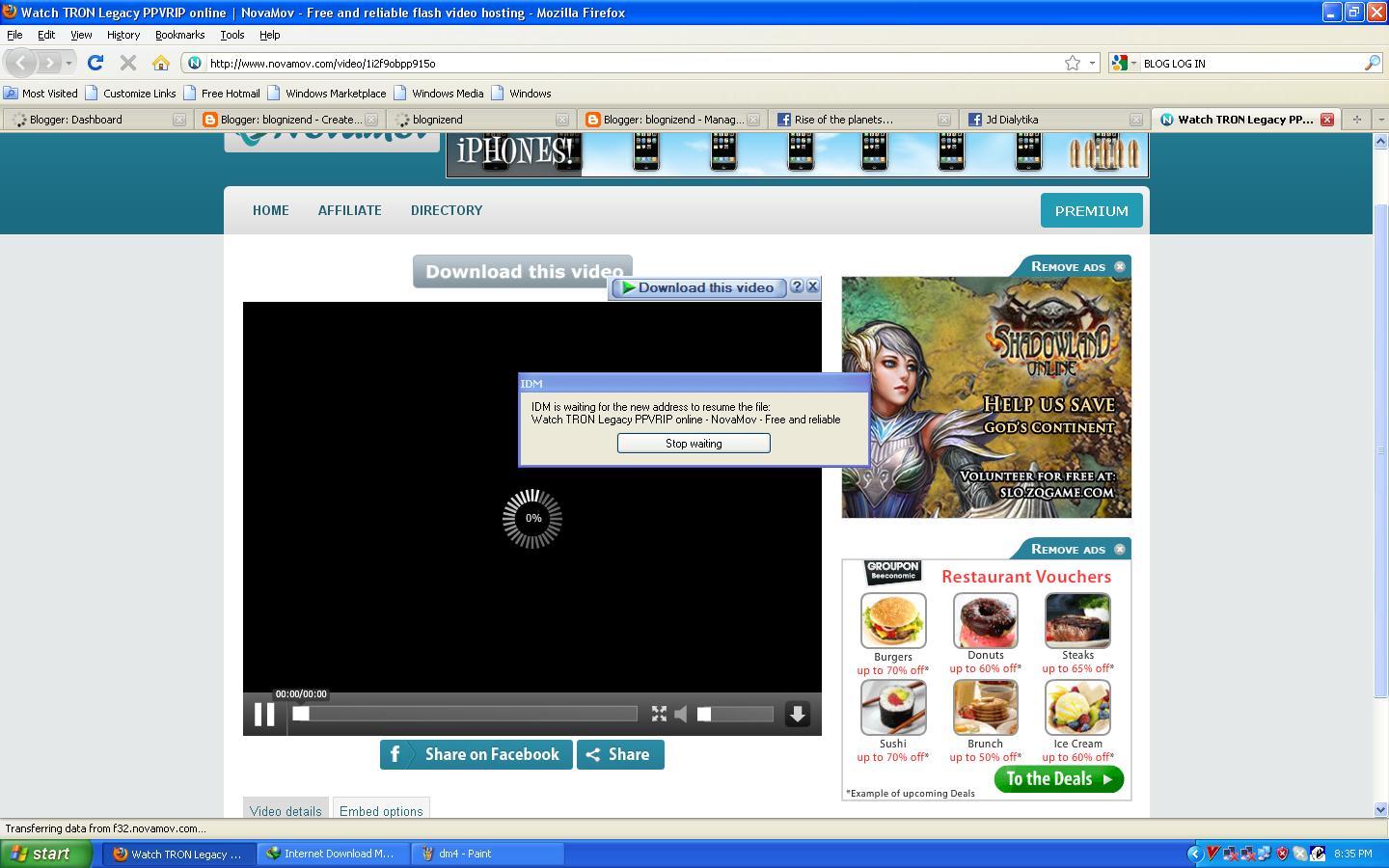
How to Resume your Download "Internet Download Manager" IDM

Resume your Download?


 And this POP out?


click Refresh Download


Click "OK"

 Don't close the Stop Waiting..
click the Download


 Now a new Link for your Download
 Resume Your Download
 Done!! :) Happy Downloading..
0 comments
Posted by: Jaime
blognizend, Updated at: 4:25 AM

Dell Ispiron B130 "Shouting Down" Due Over Heating

Hello, I have new Laptop repair is a Dell Inspiron B130.
If your Fan is Working Good well all you have to do is clean the Heat sink
1. At the back of your Laptop remove the Heat sink cover
 2. clean the Heat sick remove the 4 screw


Trouble shouting  I found its the CPU cooling Fan its not working any more. Replace it
For proper Laptop cracking go here proper way to open your Laptop
The CPU fan looks like this.


I can't find a fan, so I just used a G Force Video Card Fan (: the video card is useless anyway :P


Remove the Dell Fan,


We just need the Elise Fan,there is a round plastic at the back that is the lack
 Remove also the G force Elise :P Swap them. and put the whole G-force Fan on the Dell Fan , You need a mighty band for that :p

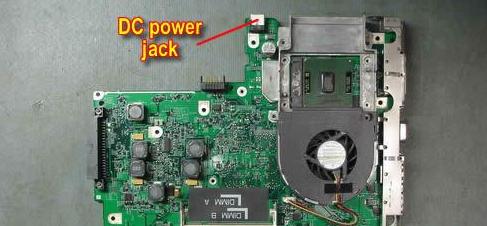
If the fan not power up you need a telephone wire
 Connect it on the DC jack


Solder here


Test your Fan plug the DC adapter the must Spin at the right direction for proper ventelation.


0 comments
Posted by: Jaime
blognizend, Updated at: 5:43 AM

HP Pavilion DV6000 "No Screen"

This day I have  HP Pavilion DV6000 no screen


 I power up the Laptop and the blue light are on, but no screen

Touch the blue light if you hear a flicker sounds well your luck!! :)
all You need is to remove the cmos battery here's how.
Try to connect a Monitor to its  Video Output  First. if  its working.  may its LCD is defective

1.at the back of your Laptop, remove the Battery

 
2. Open the memory cover. and find the CMOS  Battery

3. Now remove the CMOS battery plug out. leave it for a minute


4. Press the Power switch Hold it for about a 45seconds


5.After a minute put back the battery. plug it again, and now put back in place.

6. Test your HP Pavilion (:


0 comments
Posted by: Jaime
blognizend, Updated at: 4:37 AM

How to Share Your Internet Using a Router

 This day  my friend called me to help him fix and share his internet connection DIGITEL.There where Digitel worker  came before me and they don't know how to share the internet connection. Only a single PC directly connection to the modem can have a internet connection.
Here's what I done,

1.Connect your Modem directly to your PC. Test it  if you have internet connection
2.After tested now go to run command Run type cmd


 3. now you will see this now type" ipconfig/all"

4.now you wil see you PC mac remember that or write on a Notepad

5. Type your router default IP usually is 192.168.1.1 this one is 192.168.2.1 because the PC is connected to the HUB.
6. Authentication the default user admin and password is 1234
7.Now go to dynamic IP put your PC mac here and click clone mac and Save.

 This tuts  may apply to share SmartBro and Globe Broadband Because their Modem is to One Mac only. so by cloning the Mac you can share your internet to other PC.
DNS for DIGITEL 
202.138.128.54
124.217.127.234
or used Google public DNS
8.8.8.8
8.8.4.4

0 comments
Posted by: Jaime
blognizend, Updated at: 3:55 AM
 
Support : Creating Website | Johny Template | Mas Template
Copyright © 2011. blognizend - All Rights Reserved
Template Created by Creating Website Published by Mas Template
Proudly powered by Blogger
Google+ Jaime Lacson